A UI Design project for a tech startup that helps property owners manage their assets efficiently and hassle-free with the latest AI and LiDar technologies.
B2B Design
UI Design
Design Systems
B2C Design
PA
Property Management Platform

Log in
Sign Up
Where properties become legacies.
MPA provides you with the tools to save on home upgrades and insurance protection while keeping you in the loop.
Find eligible grants
Discover insurance savings
Increase your property value
Get the most from your home.
Get started
By signing in, you agree to our Terms and acknowledge our Privacy Statement.
Already have an account? Log in.



Role & Duration
Ongoing (Apr 2025 - Present)
Jr. UI Designer
Tools & Methods
Figma
User Persona, User flows, Wireframing,
Design Systems, Prototyping
Team
1 Product Manager, 2 Subject Matter Experts
2 Jr. UI Designers, 2 Developers
The Challenge
Overview
PA founders noticed the needless hassles property owners were experiencing when managing their insurance. They saw that property owners were missing out on savings from not knowing about available grants and insurance discounts, and they knew there had to be a better way.
PA combined legal expertise with AI, lidar technology, and key partnerships in forensic weather and financing services to create the solution—an all-in-one platform that empowers property owners to assess insurance, find grants and discounts, prepare documentation, file claims, hire contractors, and more.
This is an ongoing project currently under development. For confidentiality reasons, specific details and the full project name are not disclosed.
Problem
Property owners often struggle to consolidate complex data from multiple sources, such as structural scans, weather events, and tenant communications.
How might we design a user interface platform that integrates LiDAR technology, AI chatbots, and weather forensics to simplify property management and improve decision-making?
Solution
Design a unified user interface platform that leverages LiDAR technology, AI chatbots, and weather forensics to centralize property data, streamline management tasks, and provide actionable insights for more efficient decision-making.
Weather & Risk Center
Weather & Risk Home
Live Weather Monitoring
Current Conditions
Weather Forecast
Weather Patterns
Severe Weather Alerts
Risk Timeline
Upcoming Risks
Past Impacts
Risk Trends
Seasonal Patterns
Mitigation Planning
Prevention Steps
Material Recommendations
DIY Guidance
Alert Settings
Alert Thresholds
Alert Methods
Geographic Range
Alert Frequency
Historical Events
Event Catalog
Historical Impacts
Pattern Analysis
Savings Center
Grant Application Center
Available Programs
Eligibility Assessment
Grant Amount Estimates
Main Focus: Home Owner Portal
Our stakeholders provided an initial list of envisioned platform features. We transformed this site map into structured user flows, optimizing screen layouts and sequencing to create a more intuitive and cohesive user experience.
Our primary users are homeowners, so we focused on addressing key pain points, including: navigating dashboards for one or multiple properties, simplifying insurance and paperwork terminology, understanding the impact of grants and savings, managing properties during weather events, and receiving AI-powered alerts and smart recommendations for property-related tasks.
My assigned features were to focus on Weather/Risk Center and Grants for users.
Site Map
The Approach
Design Process
1
Persona
2
Market Research
3
User Flow
4
Wireframes
5
Design System
6
Prototype
Understanding Our User
Meet Clara
We created a persona of Floridian residents, mapping their demographics, pain points, and motivations in managing claims and policies during the case of a weather emergency.
Clara Rodriguez
Proactive, Information-Seeking Homeowner

Age
52
Education
College Graduate
Occupation
Retired High School Teacher
Location
Sarasota, FL.
Family
Husband and two adult children
Income
$78,000/year combined
TEch literacy
Moderate
Devices
Laptop & Desktop
Personality
Not tech-savvy
Overwhelmed
Bio
Clara is a retired high school English teacher who has lived in Sarasota, FL for two decades and is acutely aware of extreme weather threats due to past hurricane experiences. She seeks peace of mind through reliable, easy-to-use solutions for home safety, accurate weather updates, and practical maintenance tips that could lower insurance premiums.
Motivations
•
Wants to know her home is well-protected before a storm and confidently understand her coverage
•
Seeks simplified information on storm repair options, grant eligibility, and attorneys
•
Desires an easy-to-use system providing automated alerts, maintenance reminders, and expert guidance to simplify home management, documentation, and protection.
Needs / Pain Points
•
Struggles with confusing insurance policy language and fears financial burdens from future damage due to past denied claims caused by insufficient documentation.
•
Feels overwhelmed by the volume of information and complex tasks involved in preparing for severe weather and needs clear guidance.
•
Finds maintaining consistent home maintenance schedules difficult, and needs simple, proactive reminders to keep up with important tasks.
“I don’t want to be caught off guard again. I just want to feel like someone’s got my back—before, during, and after a storm.”
Key Insights
Claims process was overwhelming with too many steps
Policy coverage details were filled with jargon and hard to understand
Home inventory features were underutilized due to poor discoverability
Users wanted more proactive notifications about weather events and maintenance tips for filing claims.
Users are unaware of money saving opportunities from their coverage and benefits




Feature
Insurance Comparison
Service Provider Directory
Home Maintenance Tool
Home Documentation
Weather Intelligence Platform
Smart Property Automation
Details
Compares homeowners’ insurance quotes across providers
Lists and reviews contractors and service providers
Dashboard for appliance repairs and maintenance
Tracks and stores home interior photos for insurance claims
Hyperlocal weather forecasts, risk alerts, and operational planning tools
Offers smart insurance help, grant matching, home records, contractor access, and proactive protection using AI and weather tech.
PA
The Zebra
Angi
Centriq
Encircle
Tomorrow.io
Competing Services
Market Research
Understanding Our Competitors
When designing for PA I needed to position it within a crowded insurance tech market. I began by analyzing leading insurance management apps, identifying overlaps while uncovering where PA could stand apart.
This process revealed its unique competitive edge: the integration of weather forensic technology through Tomorrow.io, enabling users to anticipate and manage storm-related claims with data-driven confidence.
Breaking It Down
User Flows
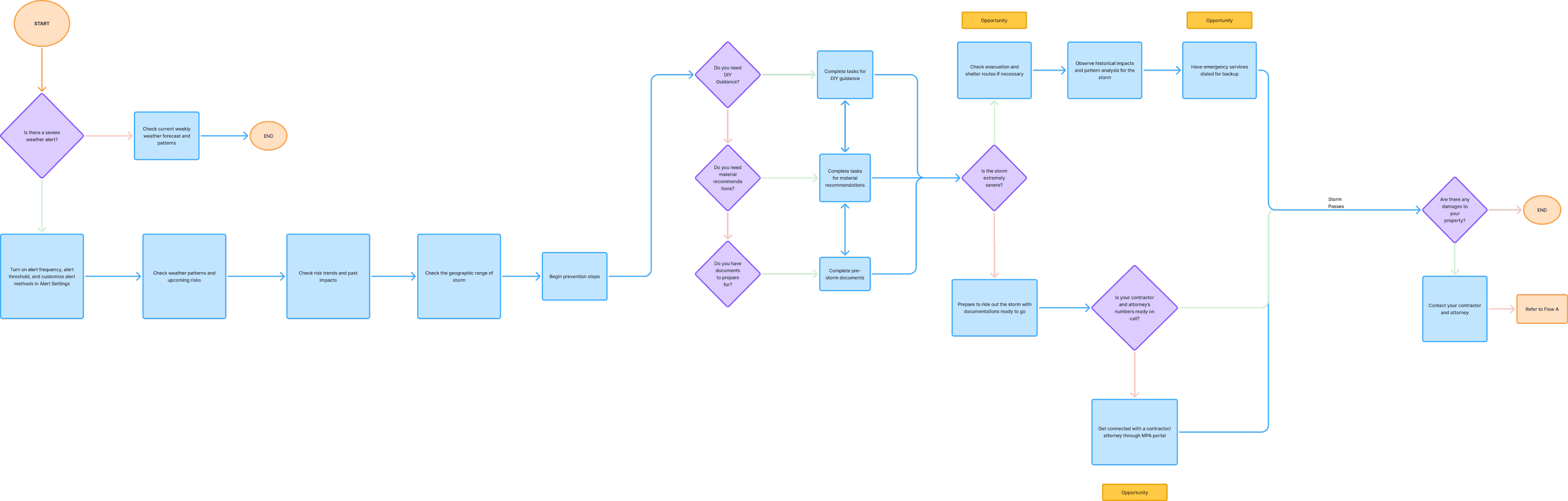
Weather
I translated the sitemap into a streamlined user flow to anticipate how users would navigate the platform during a severe weather event, ensuring that critical actions—like filing claims or accessing emergency resources—were clear and accessible under high-stress conditions.
Grants
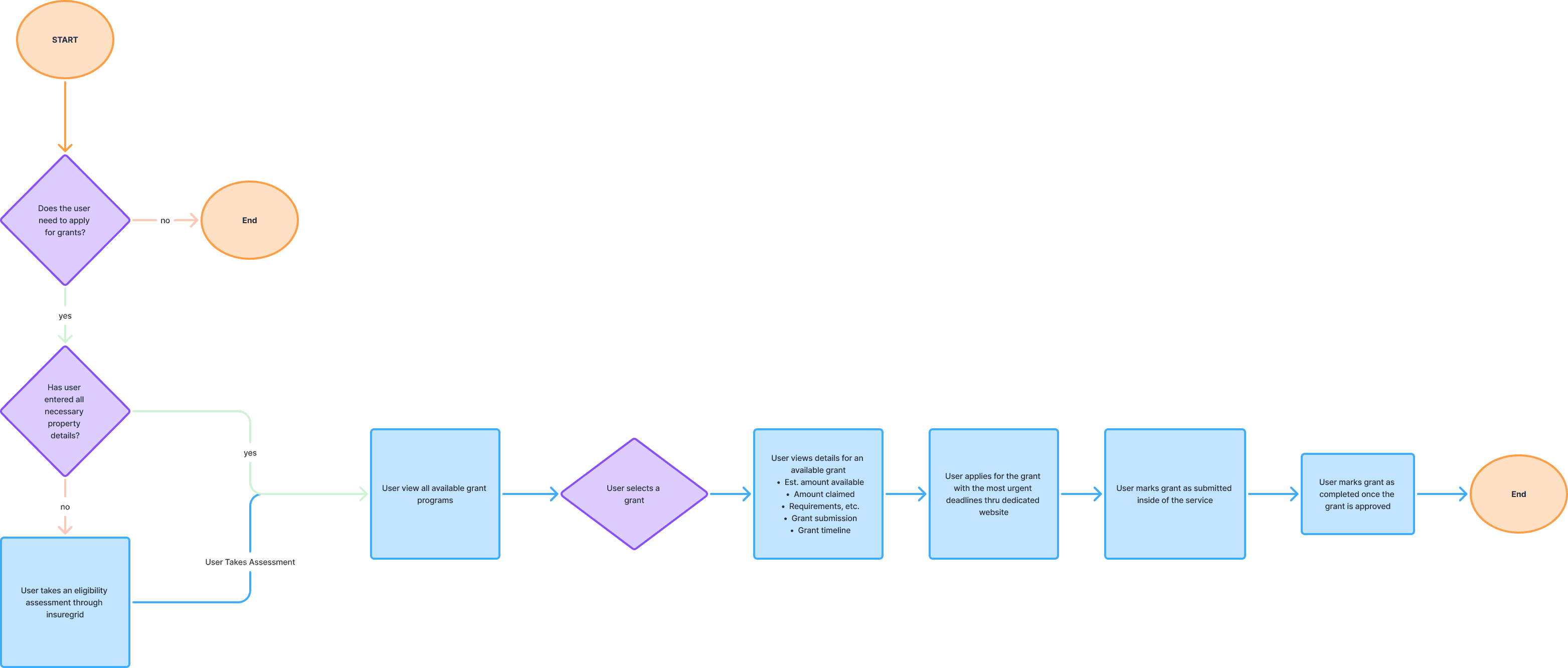
For the grants flow, I aimed to motivate users to explore grants and savings opportunities, addressing their need for financial relief while also driving engagement and retention. By positioning these resources as added value, the feature not only empowers users to maximize benefits but also strengthens the app’s overall market appeal.
Mapping It Out
Wireframes
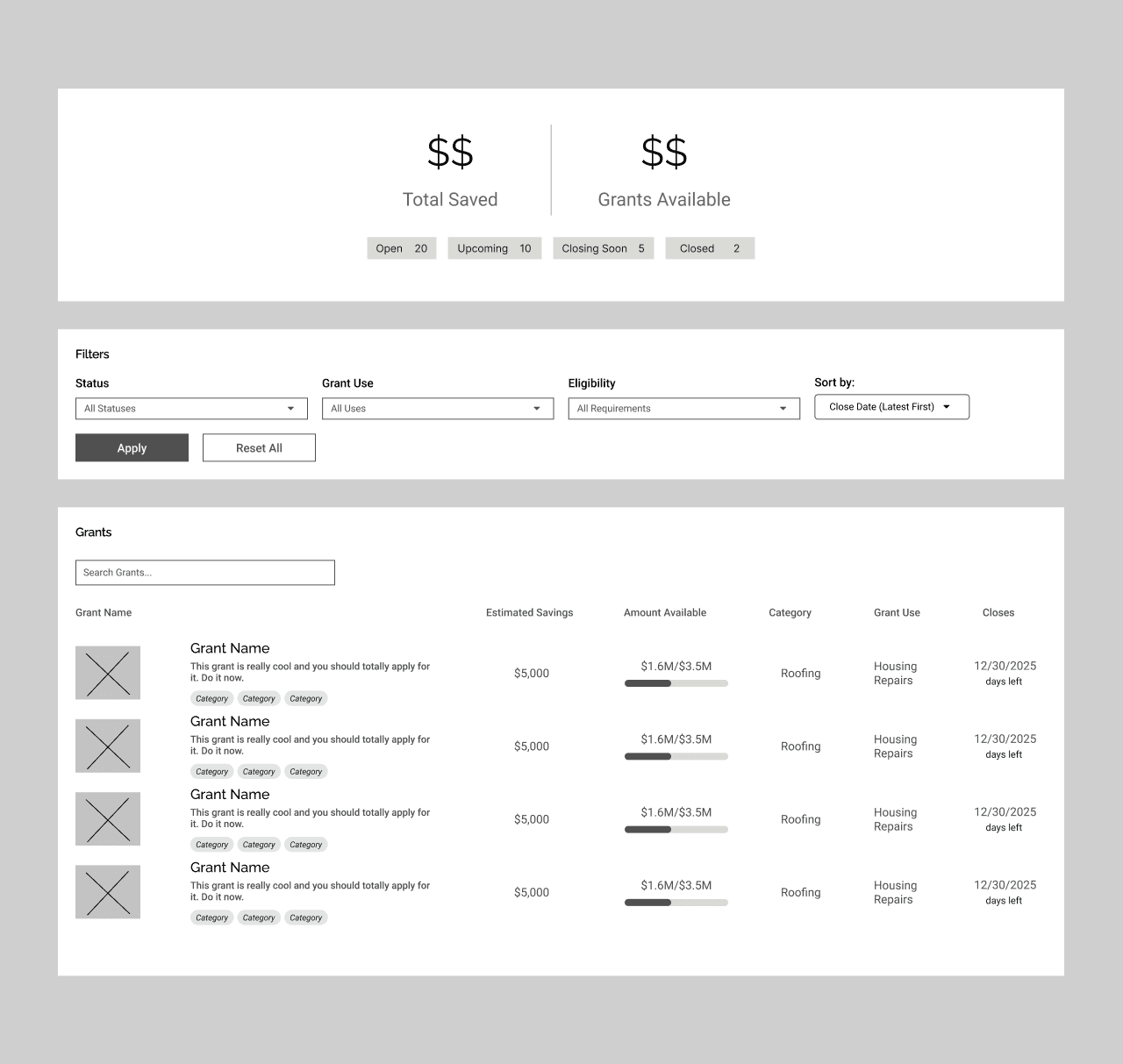
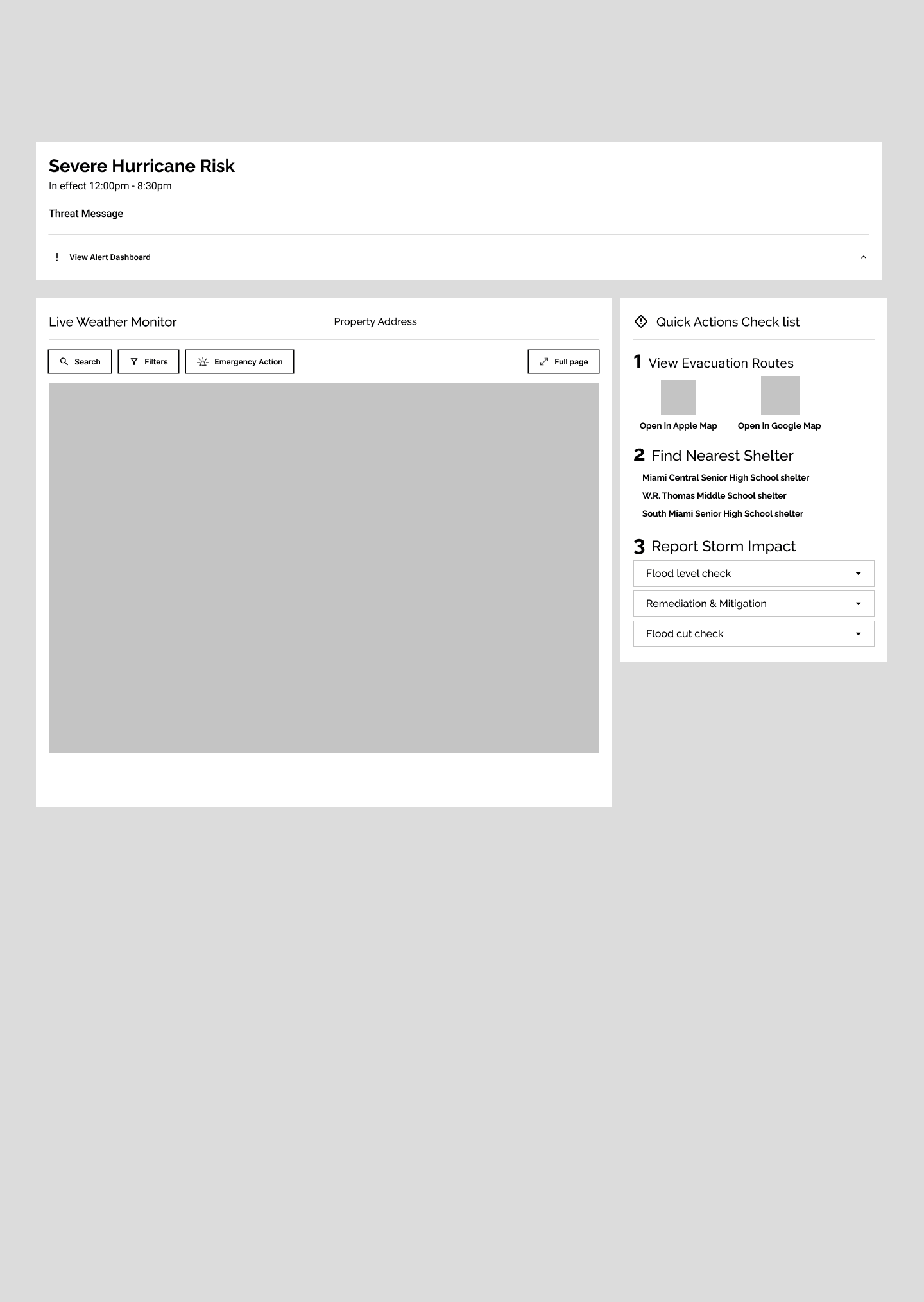
To gain a basic understanding of each step, I transferred each feature’s flow into mid-fidelity wireframes in Figma.
Grants
This feature required only a single page, as each grant seamlessly links users directly to its external source, eliminating the need for additional screens.
Weather
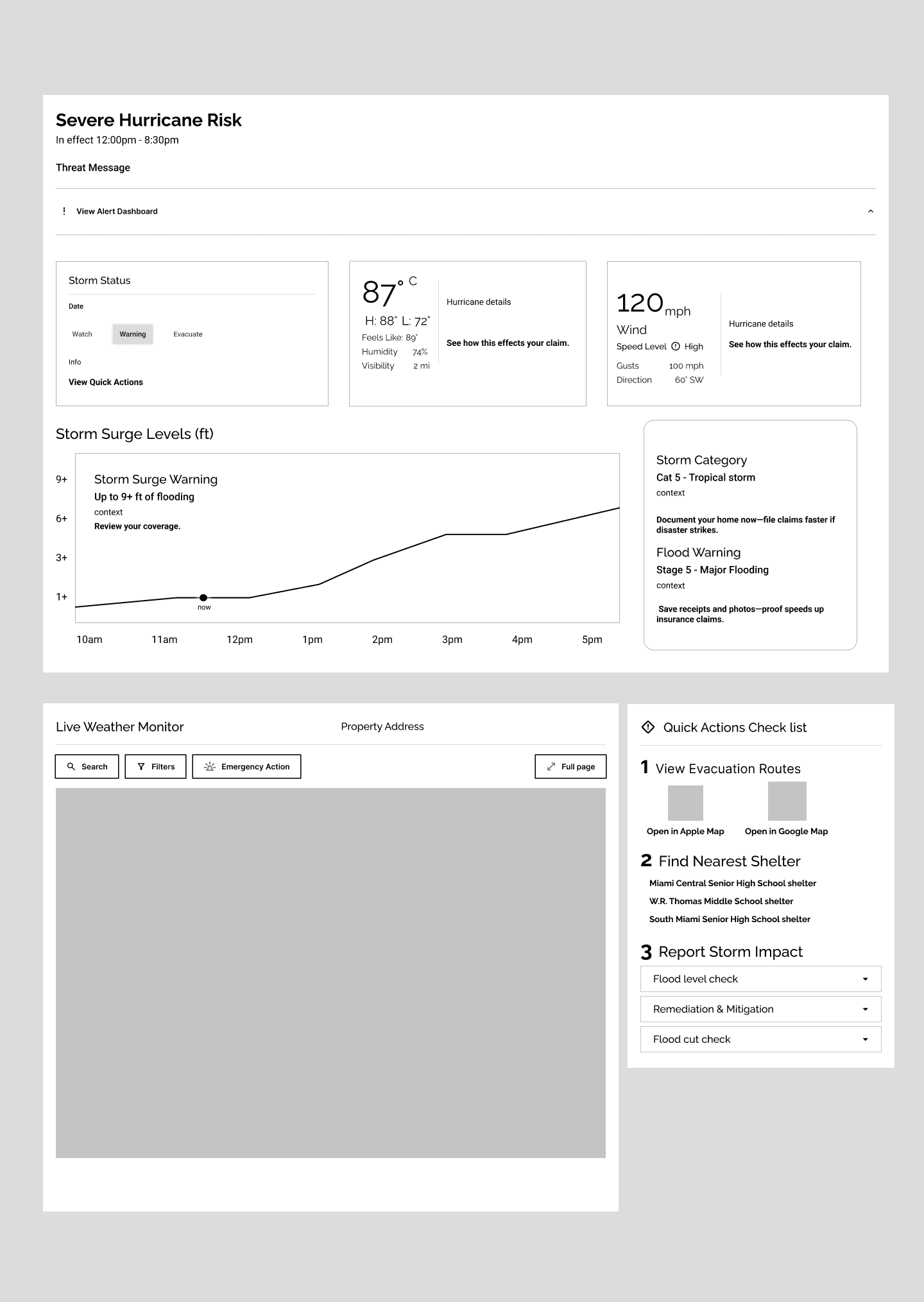
The design prioritizes helping users quickly identify a weather emergency and guiding them through safety and prevention steps. Key elements include real-time alerts, a live weather monitor, and a quick actions checklist—providing a clear snapshot of resources that reduces cognitive load and panic during emergencies.
Putting it Together
Design System
After several iterations, we set up a system to guide us in the UI design process.
Main Colors
#BAE1F6
#FBD865
Semantic
#FF522B
#295DCC
#22CC55
#CCC322
NEUTRAL
#F1F9FD
#98A6B2
#FBD865
Color Palette
Raleway
Raleway Thin
Raleway ExtraLight
Raleway Light
Raleway Regular
Raleway Medium
Raleway SemiBold
Raleway Bold
Raleway ExtraBold
Raleway Black
PRIMARY
Roboto
Roboto Thin
Roboto ExtraLight
Roboto Light
Roboto Regular
Roboto Medium
Roboto SemiBold
Roboto Bold
Roboto ExtraBold
Roboto Black
SECONDARY
Implementing Design System
High-Fidelity Wireframes
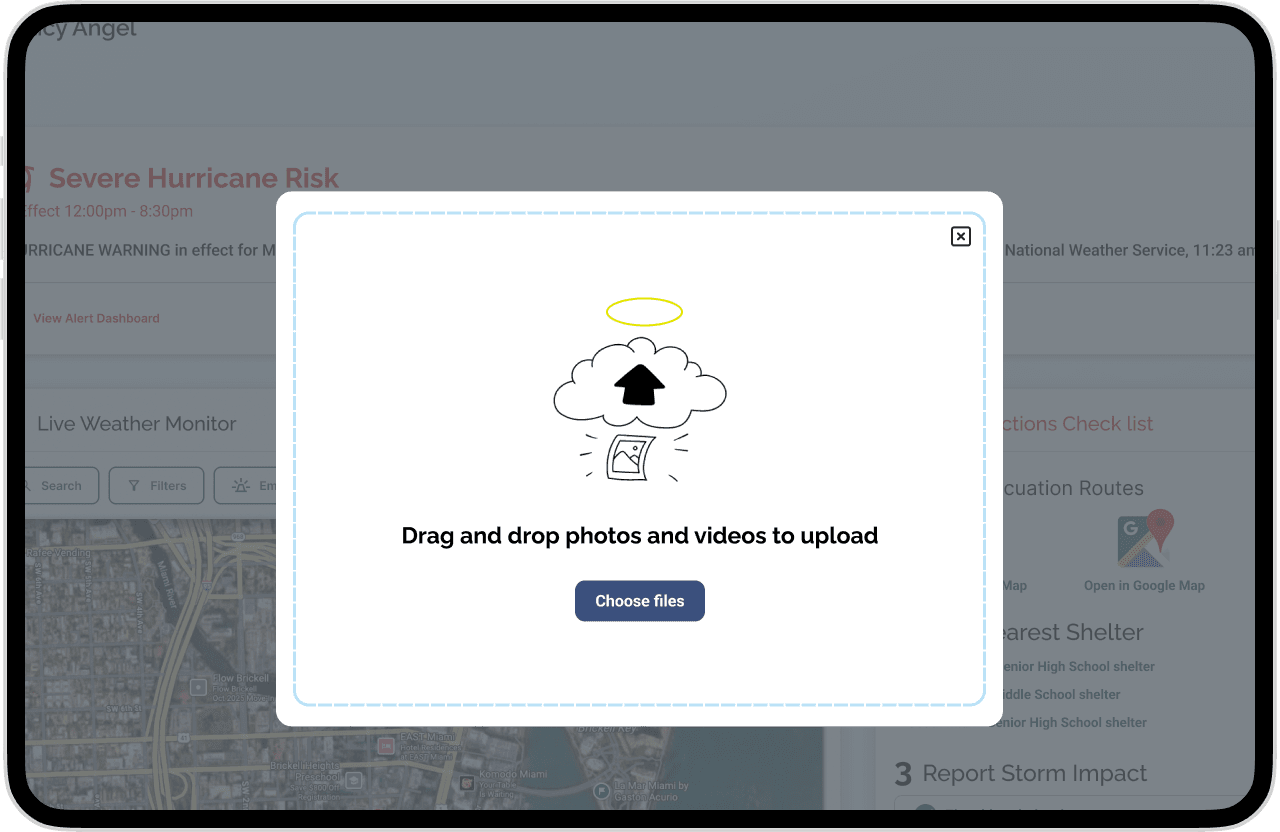
We added a few more screens to the Weather and Risks screen to show user interactions. As for the Grants screen, the page itself is static.
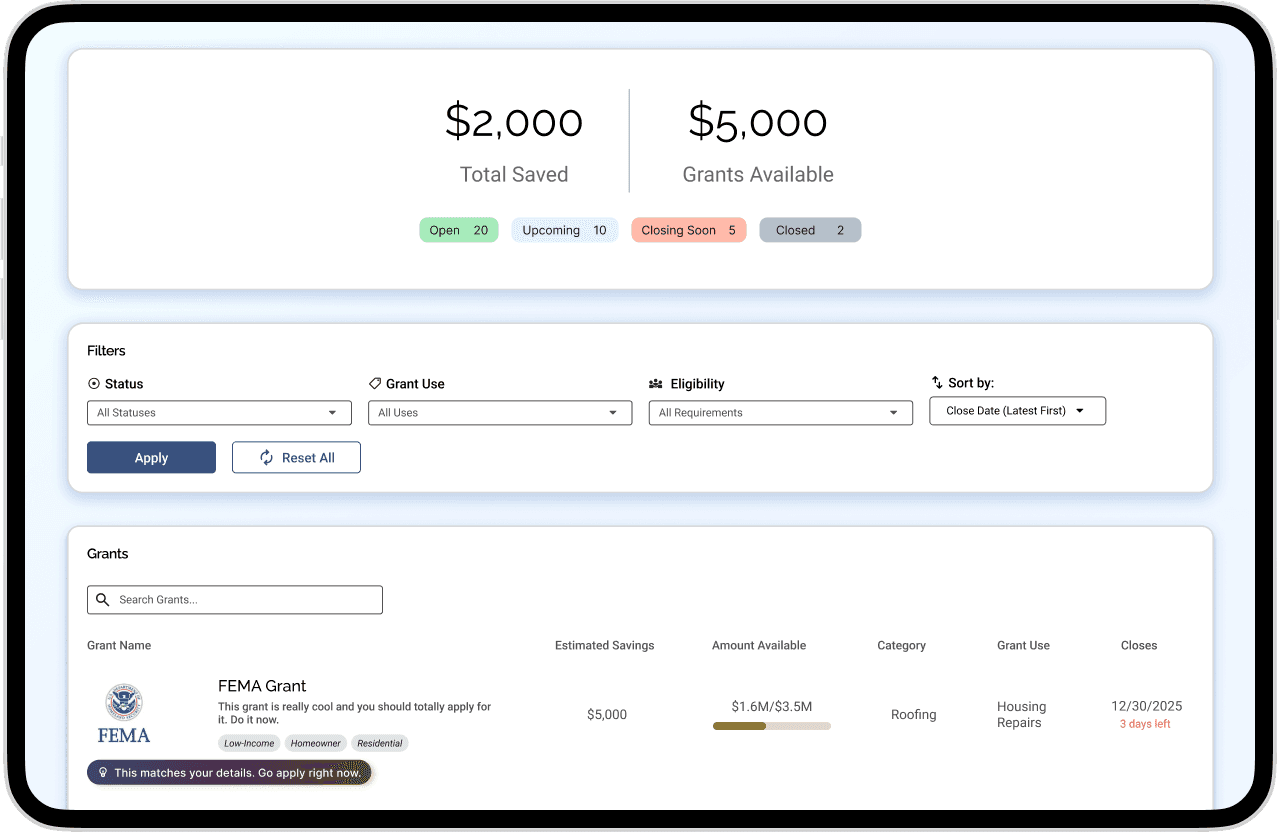
Grants
Key Features
Grants Counter: Shows total savings and available offers.
Filter System: Sorts and searches grants by status, eligibility, and deadlines.
Grants List: Highlights upcoming deadlines with key details like type, savings, and usage.
AI Suggestions: Recommends the most relevant grants based on user needs.
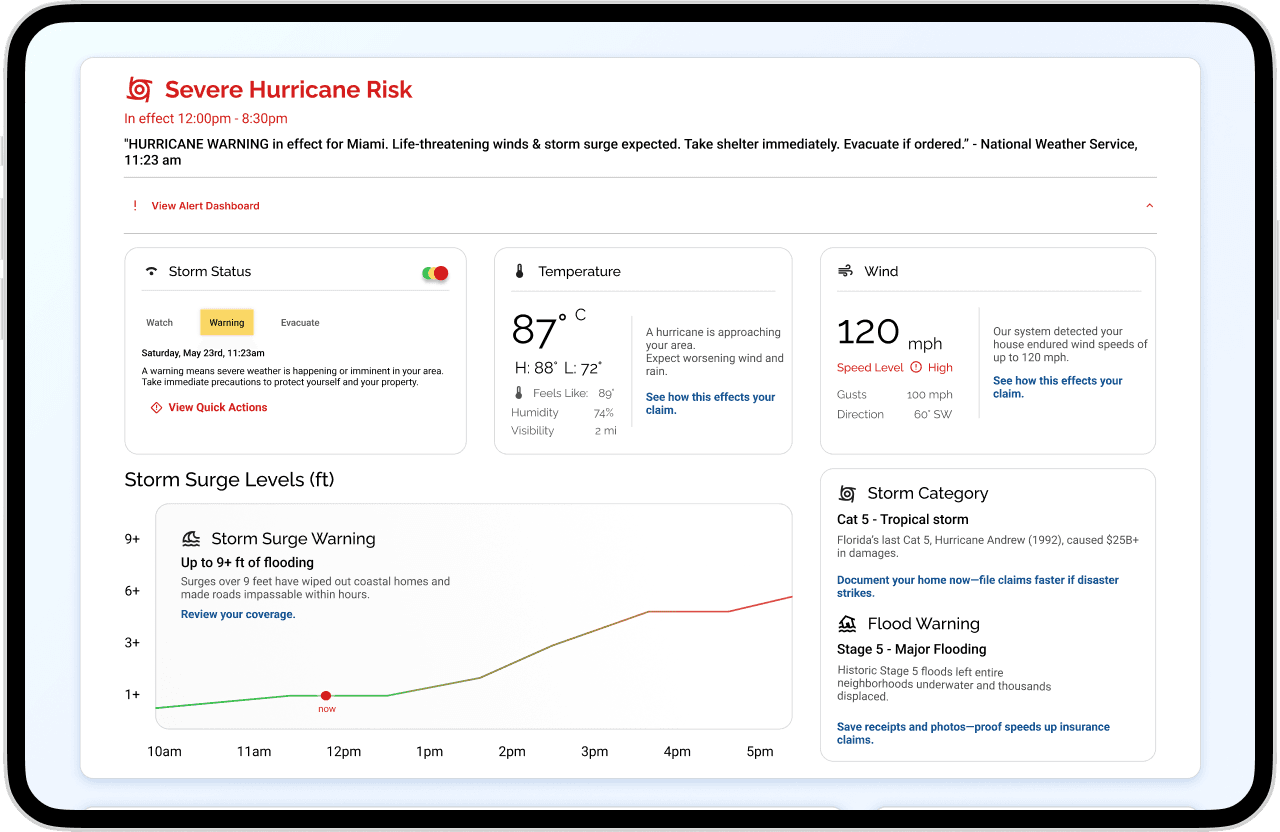
Weather Alert Dashboard
Key Features
Storm Status: Shows current alerts with time and date.
Temperature & Wind: Highlights potential impacts on property and claims.
Storm Category: Provides historical context and recommended actions.
Storm Surge Levels: Visualizes flood surge over time with current status.
Live Weather monitor
Key Features
Geographic Map: Shows storm path in real time.
Emergency Action: Provides quick access to hotlines and resources.
Filters: Switches between map modes.
Search: Finds specific locations.
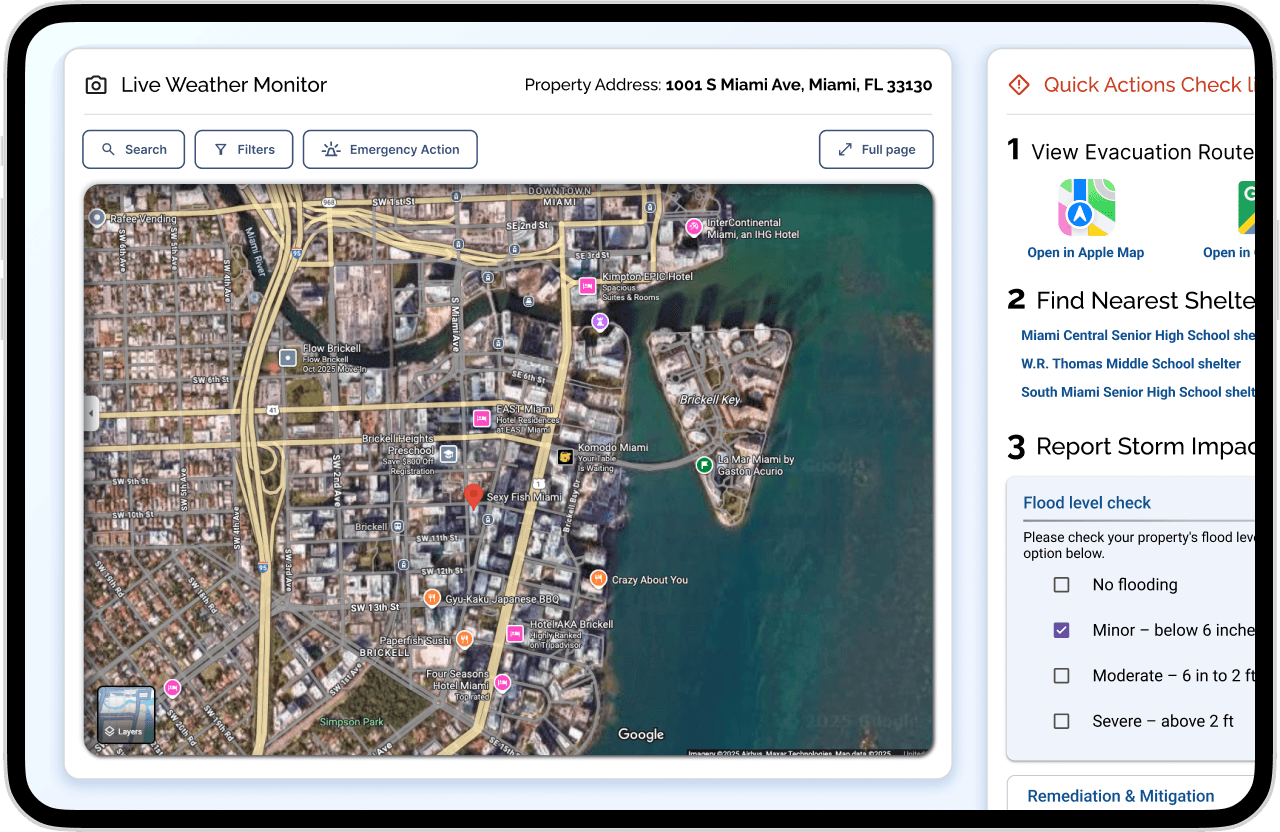
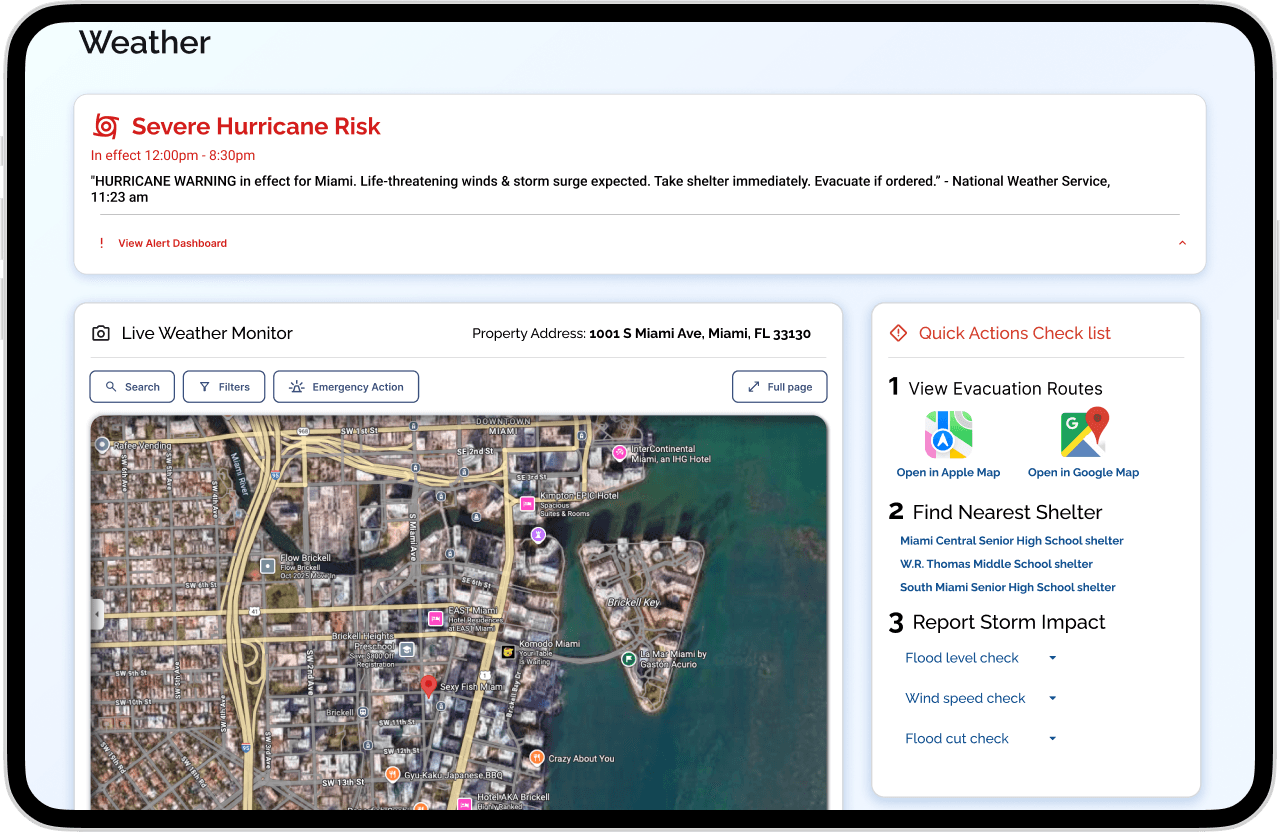
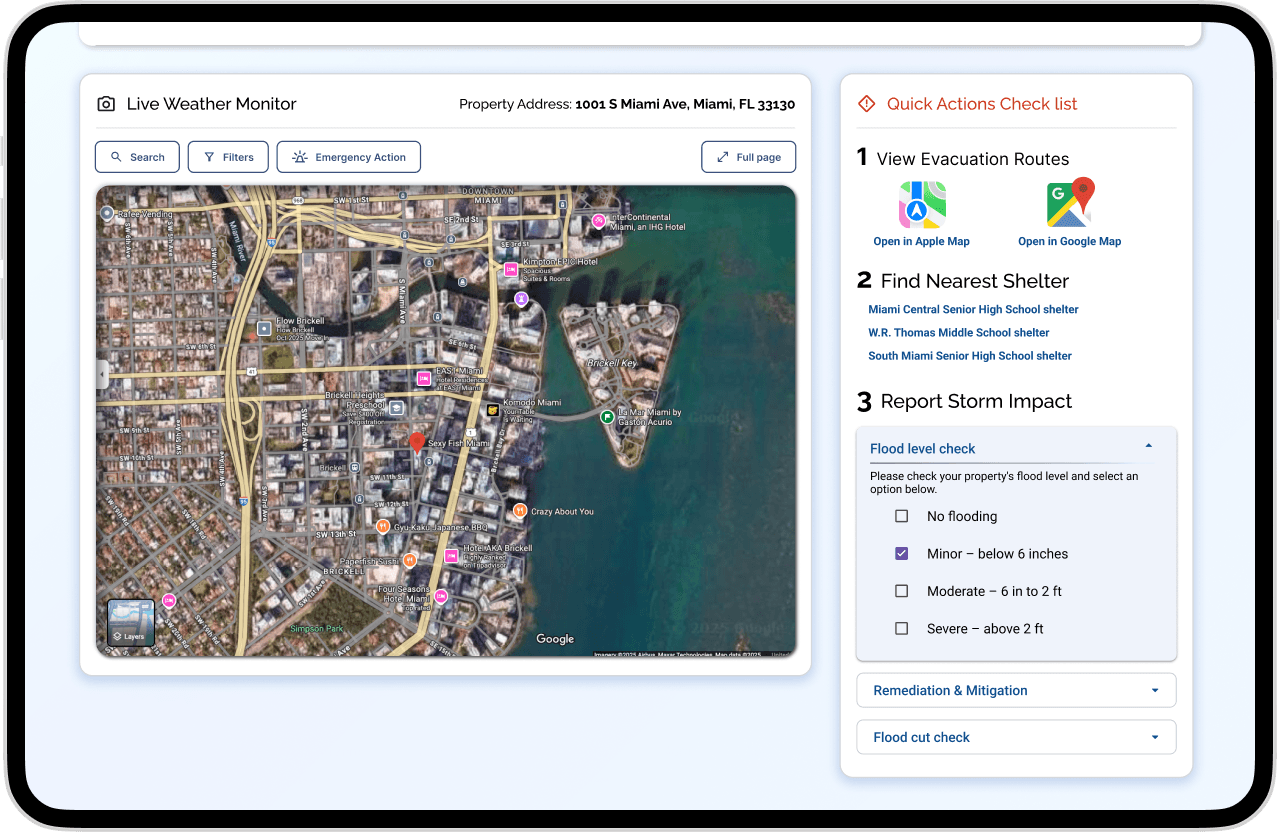
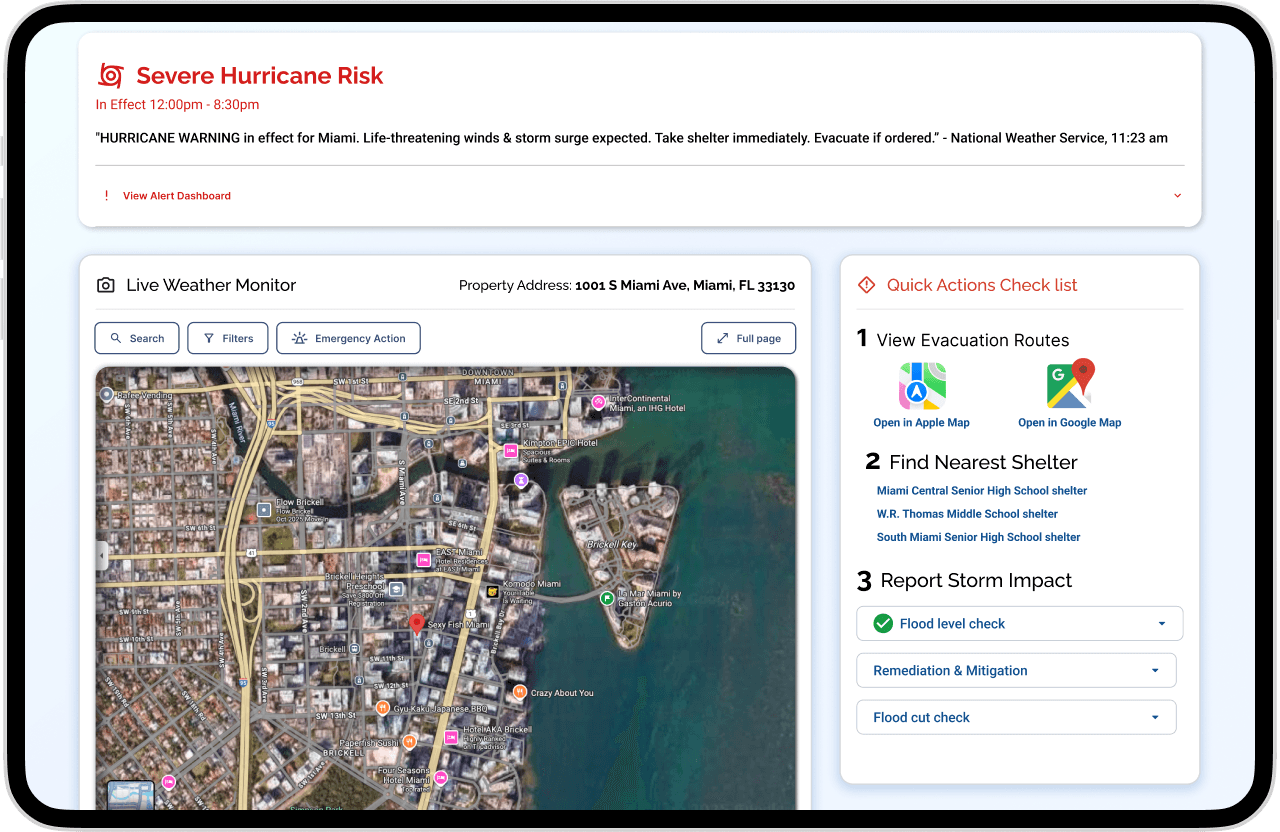
Quick Actions Checklist
Key Features
Evacuation Routes: Shows fastest paths during emergencies.
Nearest Shelter: Lists nearby shelters with accessibility options.
Report Impact: Guides step-by-step storm damage documentation for easier insurance claims.
Final Prototype
Reflection
Key Learnings
As this project is ongoing, user testing has not yet been conducted. However, as a Junior Designer, I gained valuable experience in integrating AI technology into weather data and mobile applications. I also polished my skills in thorough market research, which helped me develop unique features and ideas for the app. Additionally, I strengthened my ability to collaborate with a diverse, cross-functional team—including developers, designers, and insurance professionals—to align technical feasibility with user needs and business goals.

Next Project
angelawang.studio
Design for the community.
©
2025
Angela Studios. All rights reserved.
Designed and built with passion