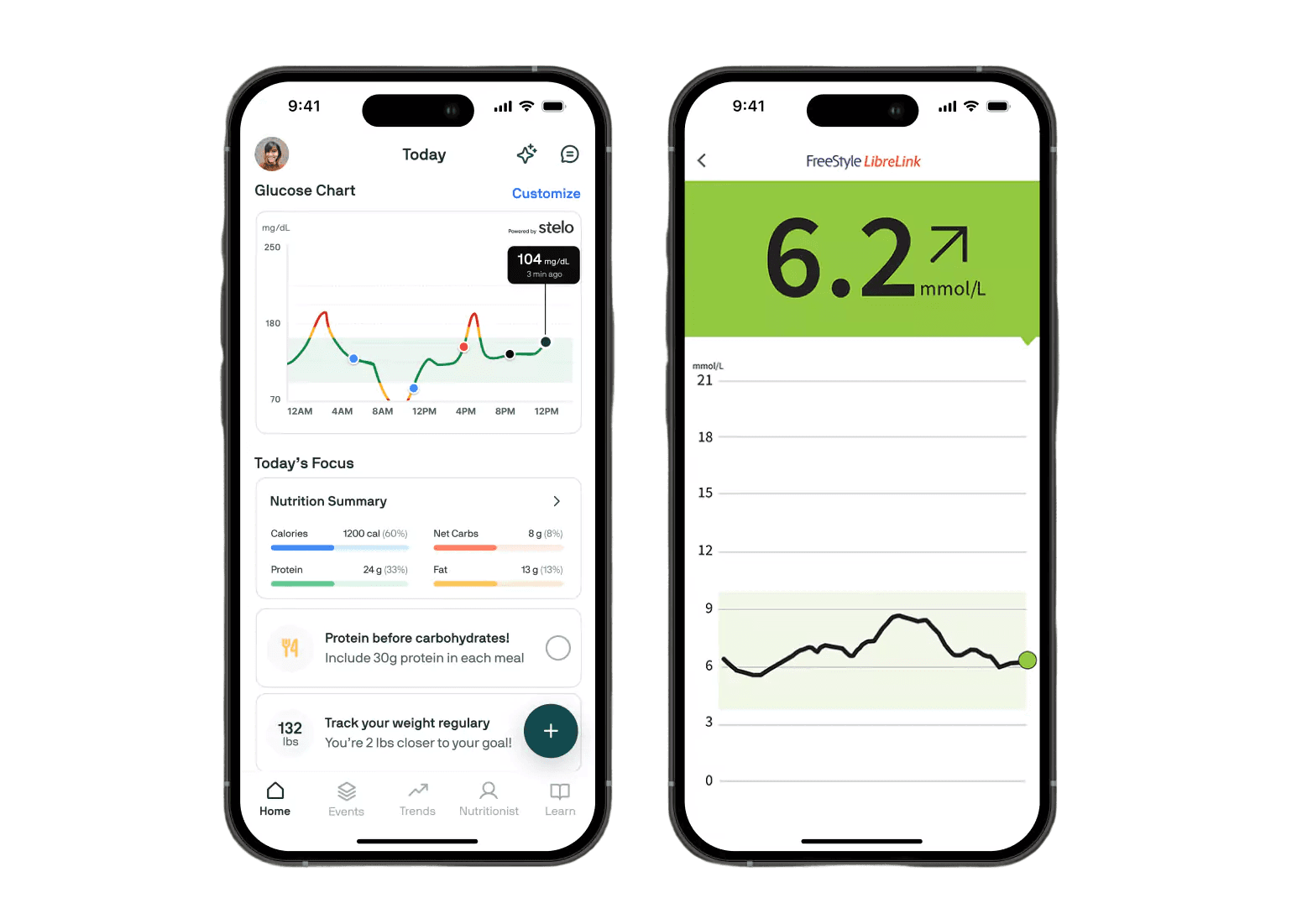
A UX research project focused on evaluating and enhancing the user experience of the existing diabetes management app, Freestyle Libre 2.
UX Research
Mobile Design
User Testing
Freestyle Libre 2
Diabetes Management App
Role & Duration
Jan 2025 - May 2025
Jr. UX Researcher
Tools & Methods
Figma, Mural
User Interviews, User Surveys, Article Research, Journey Mapping, User Personas
Team
3 Jr. UX Researchers, 1 Lead Researcher
The Challenge
Overview
Freestyle Libre 2, a diabetes management app released in 2021, has surfaced usability concerns among its users. Many people with diabetes expressed the need for a more efficient solution in a healthcare landscape that often overlooks their experiences. I was invited by J Schuh, UX Leader and Design Strategist, to join a research team tasked with identifying areas for improvement. Our focus centered on Continuous Glucose Monitors (CGMs) like the Freestyle Libre 2, a critical yet still evolving technology in modern diabetes care.
Problem
How might we improve the Freestyle Libre 2 app to better meet the needs of Type 1 diabetics using Continuous Glucose Monitors, making the experience more user-friendly, accessible, and supportive of daily disease management?
Solution
Conduct in-depth research with CGM app users to uncover pain points, needs, and goals, and outline design improvements for the Freestyle Libre 2 app.
The Approach
Research Process
🔍
Discovery
Article research
Stakeholder interviews
👥
User Research
3 in-depth interviews
25 survey responses
📊
Analysis
User persona
User journey
Mindset maps
✅
Suggestions
Redesign mockup
Redesign recommendations
KPI estimates
Research Methods
Qualitative
5 in-depth user interviews (30-45 minutes each)
3 in-depth articles research
One on one interview with stakeholder
Observing user trends and flows
Quantitative
Survey with 25+ responses from CGM users
Analysis of app survey data
User feedback on App Store
User Interview Questions
Our interview was divided into seven sections, taking 30–45 minutes to complete. The sections covered:
Background & Diabetes Management
CGM Usage & App Experience
Engagement & Task Usability
Logging, Trends, & Insights
Desired Features & Customization
Accessibility & User Preferences
Trust & Data Sharing
User Interview Highlights
S
Sydney, 28
Patient, Professional
“CGMs felt uncomfortable, and apps are keto-focused, not diabetes-focused. I need a simple way to track glucose with meals.”
L
Laura, 22
Patient, Student
“Alerts are useful, but I want more customization. Too many notifications can be overwhelming, and the sounds can be annoying, especially at night.”
E
Eli, 35
Caregiver, Grandson
“Sometimes the alerts weren’t clear or timely, making it hard to know when to step in. I needed a more reliable way to monitor and support them remotely.”
Article Research Highlights
About 25% of older adults have Type 1 diabetes, which can impact daily life and accelerate physical decline. They often need to monitor glucose more frequently than younger users.
1
Management of Type 1 Diabetes in Older Adults
Dahliwal, 2014
Over 40% of adults are initially misdiagnosed with Type 2 instead of Type 1 diabetes, leading to significant challenges for older adults.
2
When Type 1 Diabetes Strikes Older Adults
2021
Type 1 diabetes is diagnosed through blood sugar and hemoglobin (A1C) testing. Management typically involves insulin therapy, carb/fat/protein counting, frequent glucose monitoring, balanced nutrition, regular exercise, and maintaining a healthy weight.
3
Diagnosis and treatment of type 1 diabetes
Mayo Clinic, 2025
User Survey
25 Responses
👥
Age Group
Strong representation in 61+ and 18–45, a mix of older long-term diabetics and younger tech-savvy users.
💉
Diabetes Type
Mostly Type 1, with a few Type 2 (sometimes insulin-dependent due to other conditions).
📱
CGM Experience
Ranges from <1 year beginners to 6+ years veterans with CGMs.
Pain Points from CGM Survey Data
0.0
2.5
5.0
7.5
10.0
12.5
15.0
17.5
Dark Mode Requested
App Aesthetic Complaints
Fault Sensors
Warm Up Times Too Long
Compression lows
Alarm Fatique
Customizable Alerts
App/Wearable Integration
Insulin Tracking Needed
Easier Data Sharing
Cost Barrier
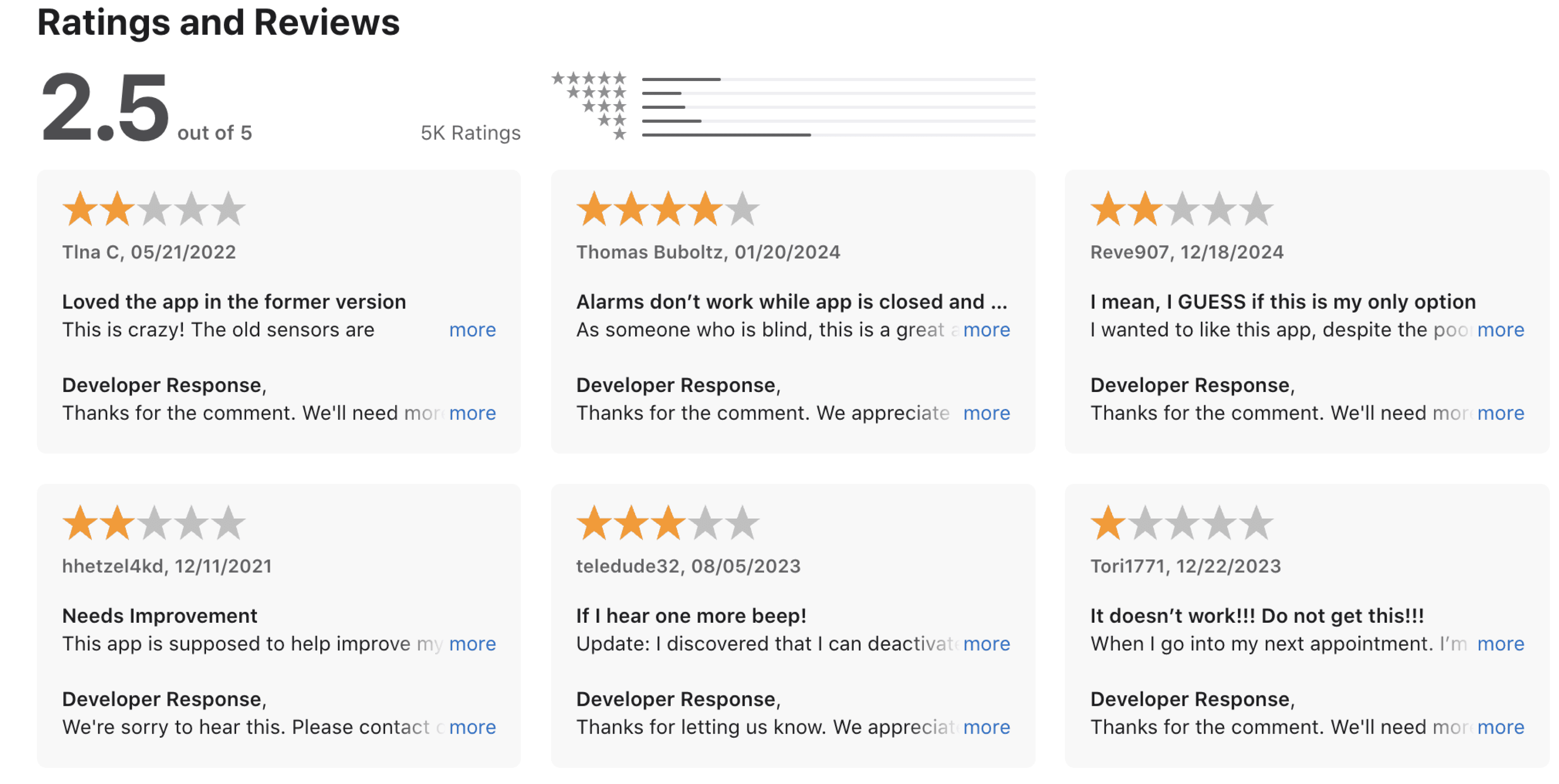
Appstore Reviews
Based on recent reviews of the app, I utilized this data and previous research to improve the user experience. Users struggle the most with app alarm settings and complaints about UI.
The Insights
Key Research Findings
Usage Patterns
Users check their CGM apps anywhere from 3–10 times daily to continuous 24/7 monitoring with widgets.
Onboarding Hurdles
Most users had minimal support, relying on doctors, online resources, or YouTube to get started. Some faced pharmacy delays, renewal issues, or faulty sensors.
Key Benefits
Users value fewer finger pricks, real-time trends, and safety alerts, with Dexcom users praising easy doctor data sharing; A1C visibility and lock-screen widgets add extra convenience.
Fustrations
Users reported poor design (no dark mode, weak aesthetics), unreliable sensors with long warm-ups and false readings, alarm fatigue, limited integration, no insulin tracking, and high costs—especially burdensome for Type 2 users.
Understanding Our User
Meet The Weavers
I developed two personas to capture distinct perspectives: the primary persona representing the main app user, and the secondary persona representing their caregiver. This dual approach allowed me to analyze the app’s functions through multiple lenses, fostering a more holistic understanding of user needs and guiding the design toward a universally accessible experience.
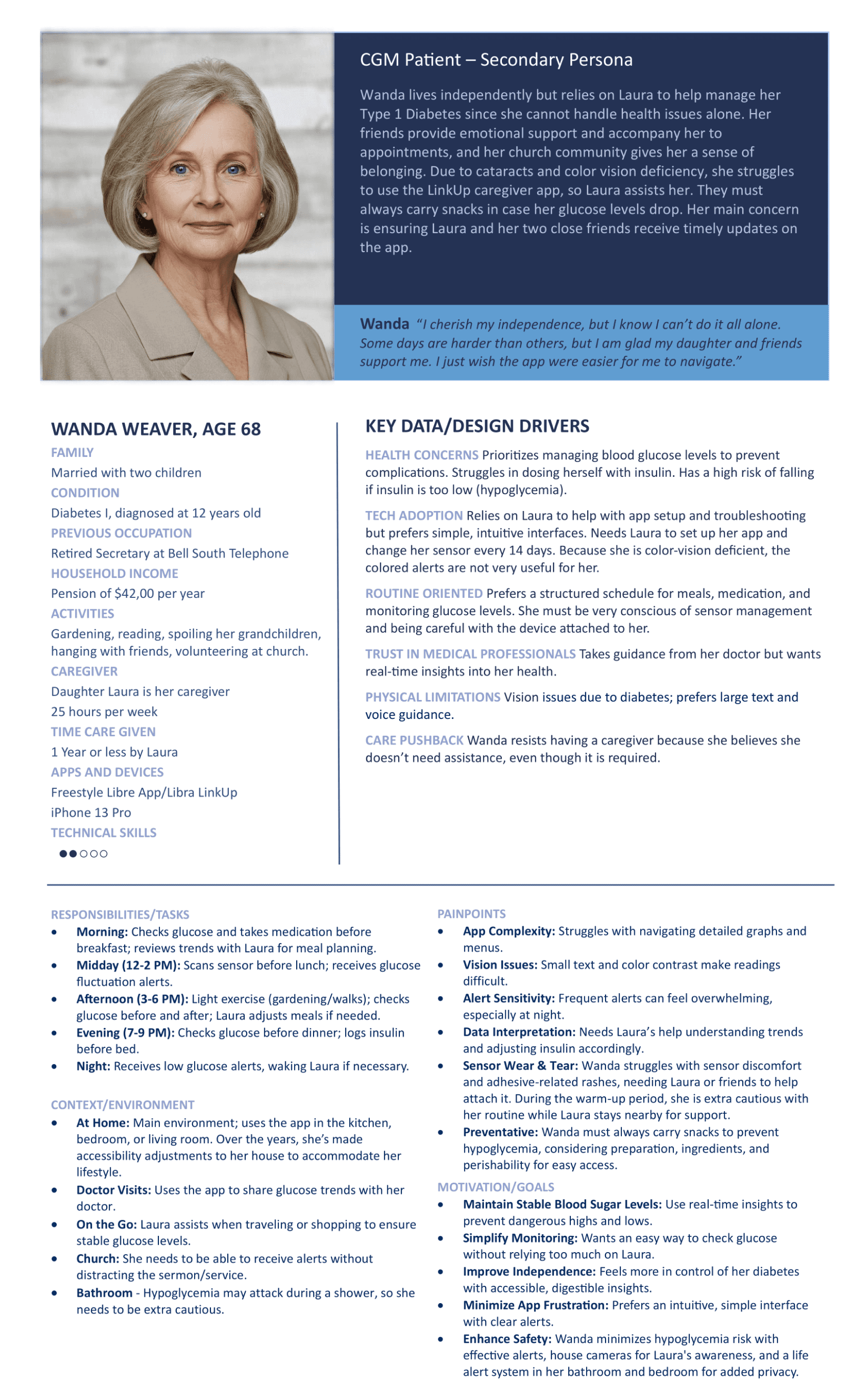
CGM Patient - Primary Persona
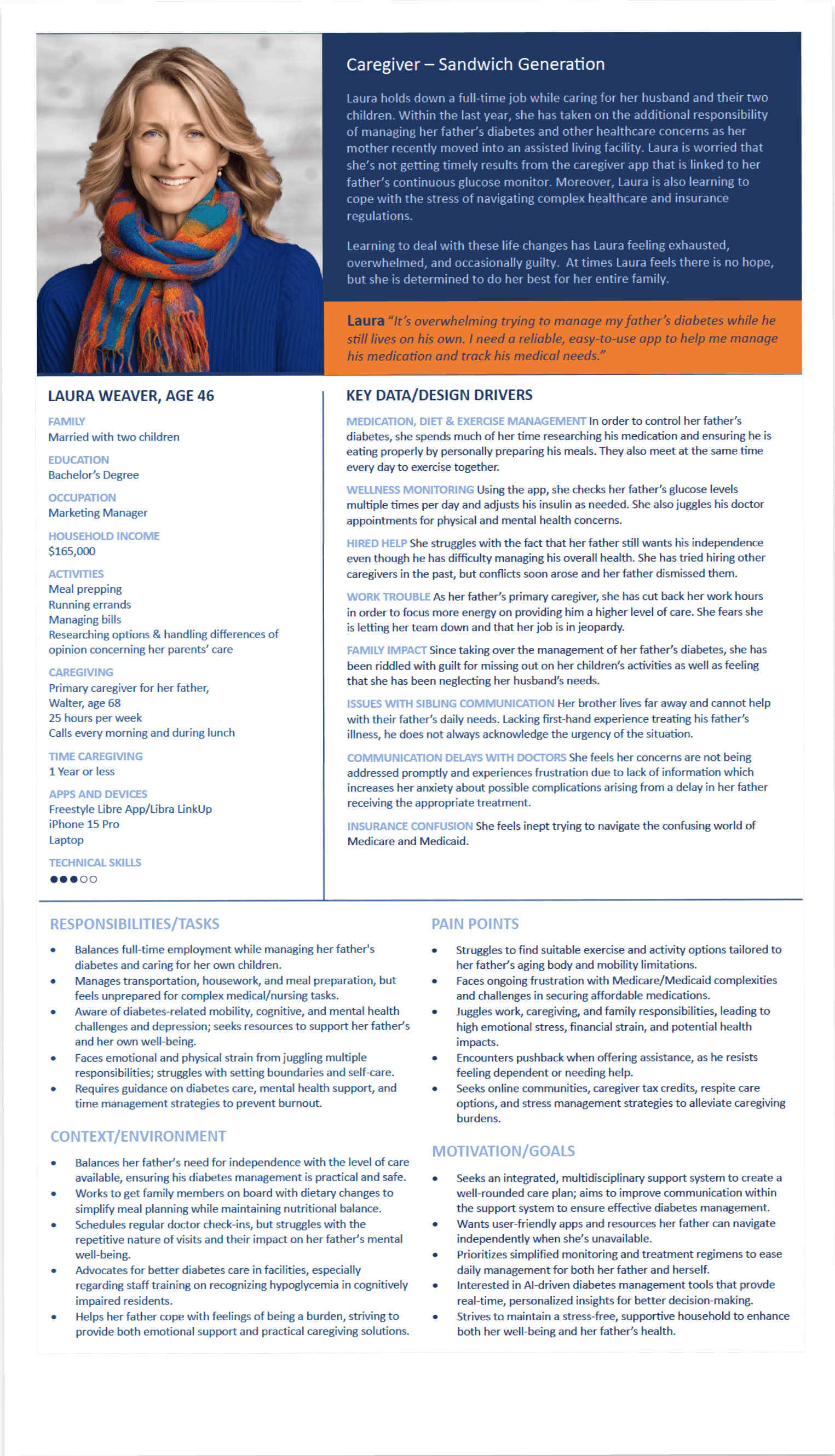
Key Insights
Primary
Patients desire a way to receive real-time alerts and updates
They hope that in the case of a glucose spike, they can quickly address the issue no matter what
CGM should not interfere with daily function and should be discreet yet informed updated notifications.
Key Insights
Secondary
Caregivers need to be able to reach their patient in the case of an emergency
Notifications and communication between caregiver and patient should be more efficient
Caregivers should be able to help patient manage diet, lifestyle, etc, if they are unable
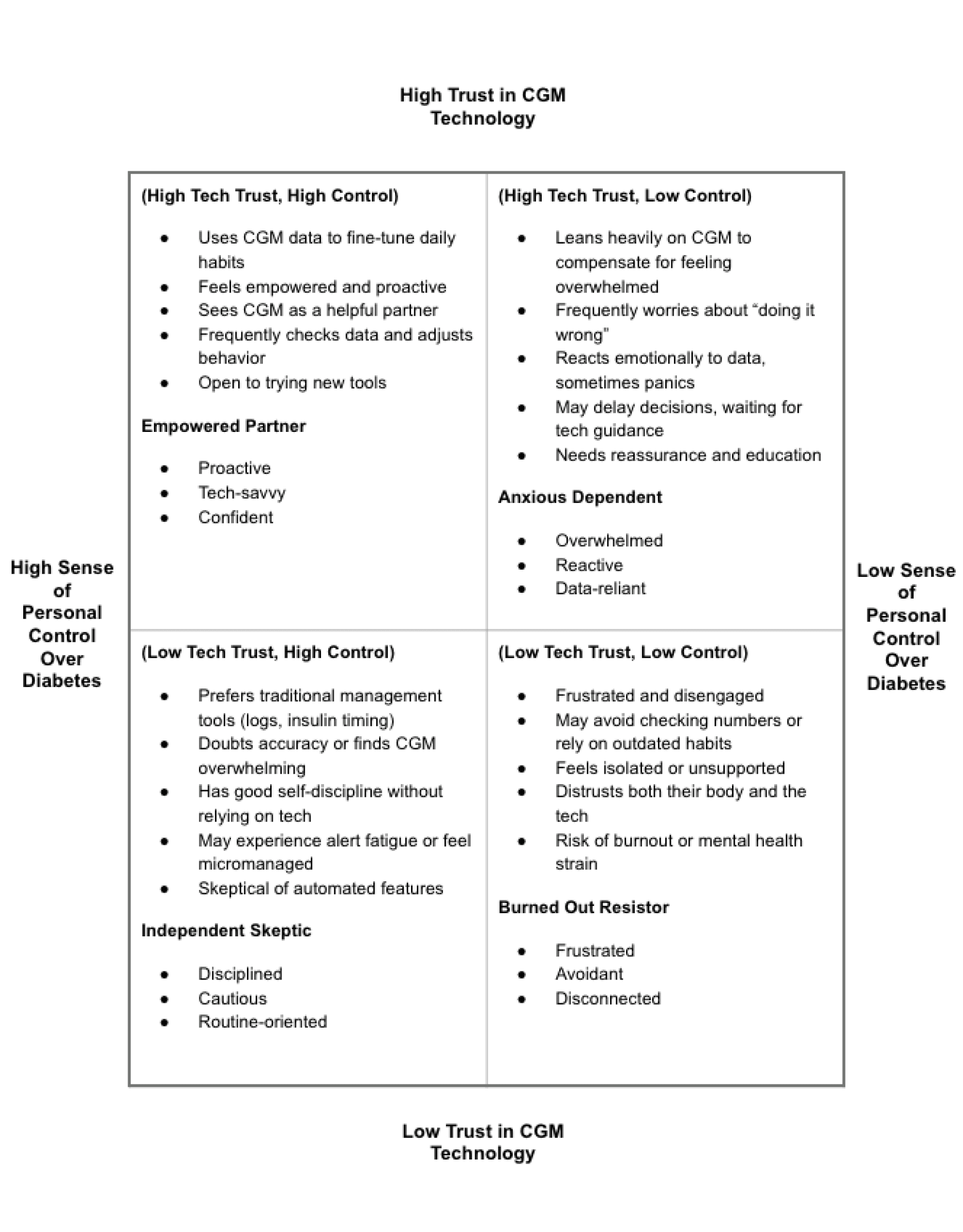
Mindset Map
Mapping how users may feel about Continuous Glucose Monitoring (CGM) devices allows us to uncover emotional drivers, frustrations, and behavioral patterns. These insights help identify pain points and habitual interactions that inform more empathetic, user-centered design decisions
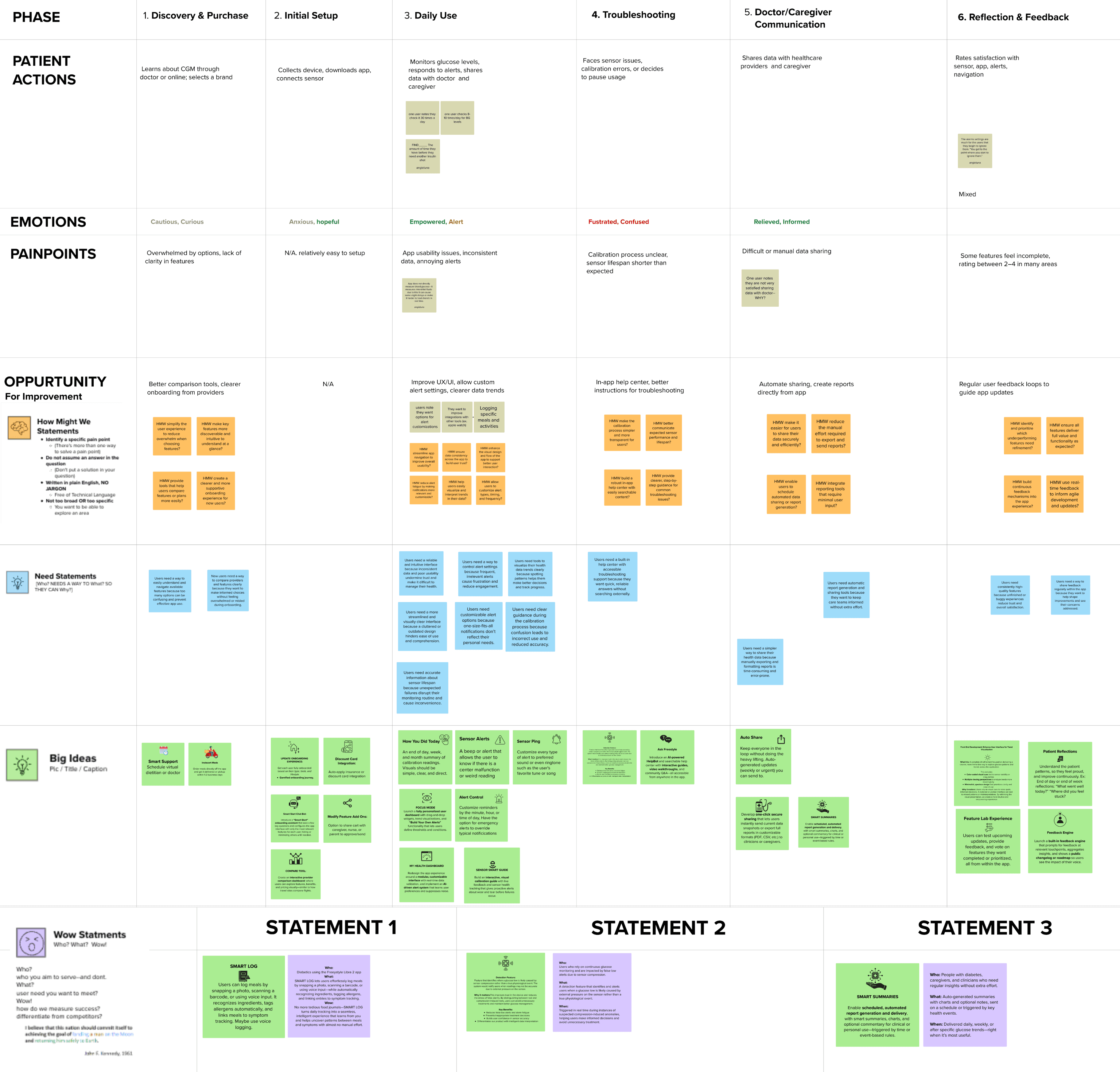
User Journey Map
Mapping the emotional landscape of the health monitoring process to highlight key touch points, challenges, and opportunities for improving the overall experience based on research.
Purchase
Feeling:
Hopeless
Pain:
Overwhelmed
Setup
Feeling:
Cautious
Pain:
Onboarding
Daily Use
Feeling:
Empowered
Pain:
Usability errors
Troubleshooting
Feeling:
Confused
Pain:
Unclear calibration
Caregiver
Feeling:
Informed
Pain:
N/A
Reflection
Feeling:
Mixed
Pain:
Alarm Fatigue
Suggested Re-Design
Recommendations
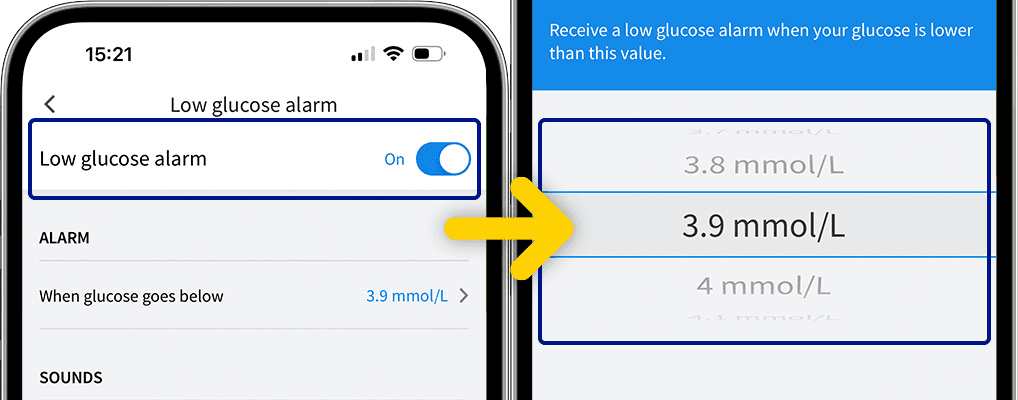
Before
UI does not appeal to most users
Alarms not very customizable
Users experience alarm fatigue
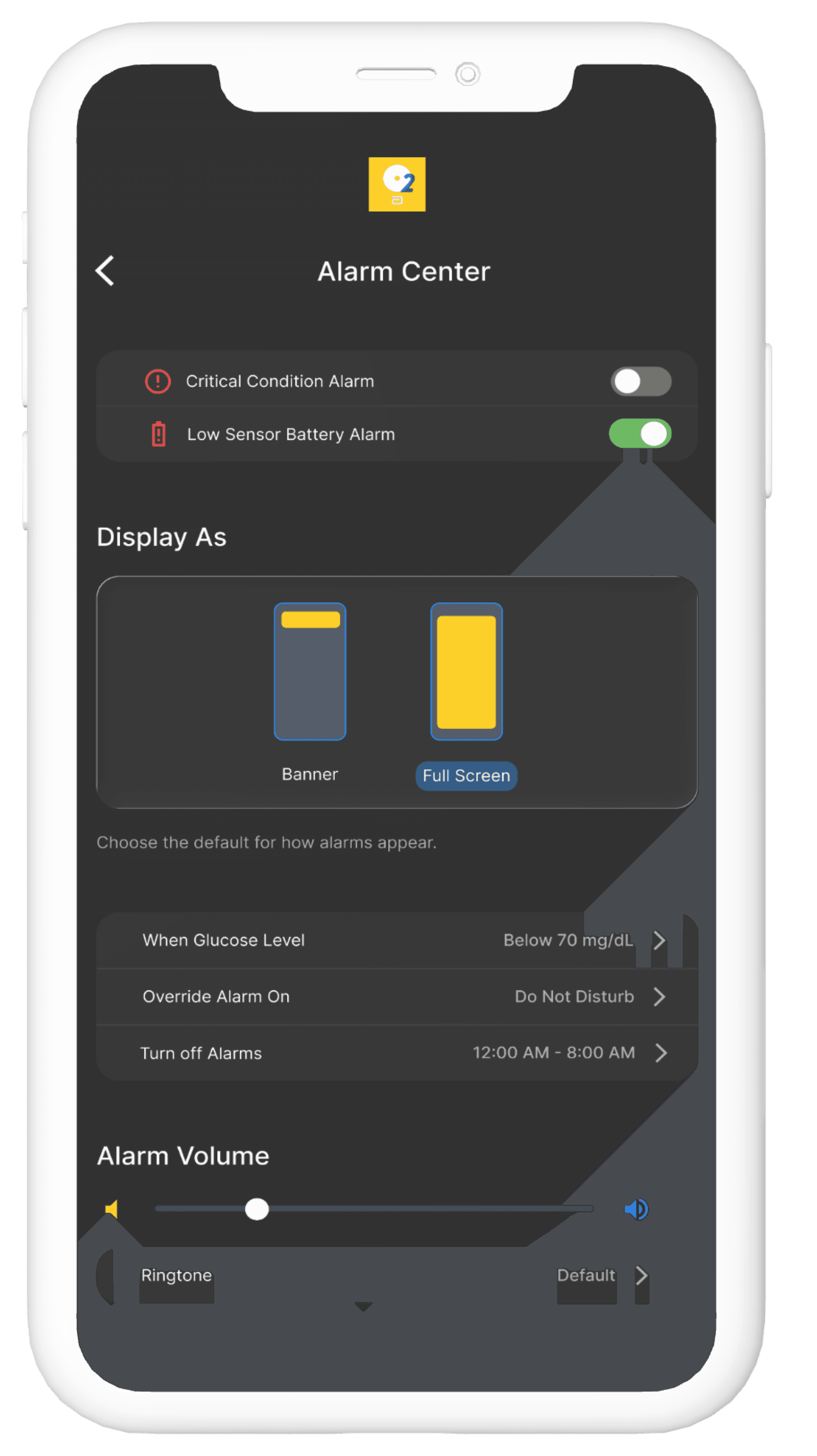
After
Modern, dark mode UI
Reduced alarm fatigue
Customizable alarm priority levels
Other Improvement Suggestions
🔨
Reliability Improvements
Better sensor QC + shorter warm-up times.
🎯
Onboarding Support
Most people self-teach — opportunity for guided setup flows, tutorials, and troubleshooting help.
💰
Affordability Transparency
Especially for Type 2s, clearer info about costs and insurance could help adoption fatigue; allow priority levels.
Final Results
Key Learnings
Estimated Implementation Results
Estimated Implementation Results
Retention Rate
48%
+26%
Daily Active Users
24,500
+40%
Onboarding
Completion
82%
+35%
User Satisfaction
4.6/5
+1.2
While formal user testing was not conducted, estimated metrics were derived using secondary research, competitor benchmarks, and heuristic analysis. For example, by improving alarm customizations and app UI, the redesign was projected to reduce users’ alarm fatigue 25%—based on usability data from similar diabetes management apps. Engagement and retention rates were also inferred through comparisons with market averages, helping validate design impact and guide next-phase testing priorities.
Research Insights
Real-time reassurance: Users want timely, clear, and discreet alerts to prevent alarm fatigue.
Dual perspectives: Patients and caregivers need solutions that balance autonomy and support.
Seamless integration: Devices should fit daily routines without disruption or unwanted attention.
Emotional journey: Anxiety, frustration, and relief shape how users engage and stick with tools.
Process Improvements
Customizable alerts: Tiered notifications (critical vs. informational) to cut fatigue while maintaining safety.
Inclusive personas: Design for both users and caregivers to improve accessibility.
Empathy-driven mapping: Align features with emotional highs/lows for timely support.
Iterative testing: Use usability tests and diary studies to validate real-life interactions.
Next Project
USA Shaolin Open
angelawang.studio
Design for the community.
©
2025
Angela Studios. All rights reserved.
Designed and built with passion